


Executive summary
We’re the AGV and AMR integration team at SCM Champs. Of every call we get, this is the most common: the robots are on the floor, the warehouse orders are in SAP EWM, and the two won’t talk to each other. We’ve walked into enough of these warehouses to know the silence is rarely random — and it’s almost always faster to fix than people fear, because the robots themselves usually aren’t the problem.
The business challenge
When the floor goes quiet, the cost isn’t one idle robot.
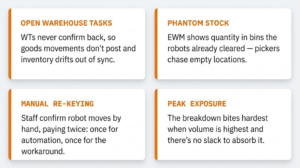
A stalled AGV or AMR is the visible part. The expensive part is what happens in the system. Warehouse tasks stay open, so the goods movements behind them never post. Stock shows as available in EWM while it’s already sitting on a pallet halfway across the floor. Pickers get routed to bins a robot emptied an hour ago. To keep outbound moving, someone starts keying confirmations by hand — so you’re now paying for automation and running a manual process on top of it. At peak, that gap is exactly where service levels break.
What we see on the floor
Across the integrations we’ve worked on, it almost always traces back to one of these.
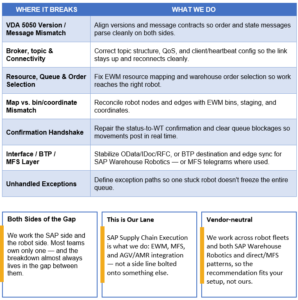
When AGVs or AMRs go silent with SAP EWM, we check these in roughly this order. Most of the time the failure is upstream of the robot — somewhere in the message path between the system and the floor.
VDA 5050 version mismatch
The robot fleet speaks one version of VDA 5050; the control layer expects another. Order and state messages still move across the broker, but fields don’t line up — so orders get silently rejected or sit unacknowledged. Nothing errors loudly. It just goes quiet.
MQTT broker & topic configuration
Wrong topic structure, mismatched client IDs, a QoS level that drops messages, or a connection that times out and never cleanly reconnects. Heartbeats stop, the controller marks the robot offline, and task dispatch halts.
Resource & queue setup in EWM
The robot resource isn’t mapped, or warehouse order selection — resource group, queue, activity area — is configured so the orders the robot should pull never land in its queue. EWM is creating the work; it simply isn’t reaching the floor.
Map vs. master data mismatch
The nodes and edges in the robot’s map don’t reconcile with EWM storage bins, staging areas, and coordinates. The robot accepts the order, then can’t resolve where the destination bin physically is.
The confirmation handshake
The robot finishes the move, but the status message never converts back into a warehouse task confirmation and goods movement posting — often a stuck qRFC queue or an unhandled status code. EWM still thinks the task is open. This is the one that quietly corrupts inventory accuracy.
Interface & platform layer
OData, IDoc, or RFC errors between EWM and the fleet management system — or, on SAP Warehouse Robotics, a misconfigured BTP destination, Cloud Connector, or edge-node sync that breaks the link between the orchestration layer and the floor. (For tightly coupled setups, the same applies to MFS telegram communication over TCP/IP.)
Undefined exception handling
When a robot hits a blocked aisle, a low battery, or a failed pick, there’s no defined path back into EWM. One unhandled exception, and the whole queue stalls behind it.
How SCM Champs fixes it
We don’t start by rebuilding. We start by finding where the message path breaks.
The fix for a version mismatch looks nothing like the fix for a stuck queue. So we trace the chain end to end — EWM → interface or orchestration layer → broker → robot, and back again — to find the exact point of failure before touching anything. Then each fix maps to a specific root cause.
What “fixed” looks like
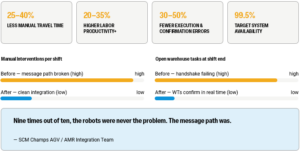
When the path is clean, the numbers move in one direction.
Ranges below reflect typical outcomes reported across SAP EWM–based robotics programs and the before/after pattern we commonly see after a clean integration. They’re directional benchmarks to set expectations — not a guarantee for any specific site.
Why this matters
A warehouse robot is only as reliable as its connection to the system that tells it what to do. When EWM and the floor stay in sync, automation delivers what it promised — fewer steps, cleaner stock, steady throughput when volume spikes. When they drift apart, you carry the cost of automation without the benefit. The whole difference is integration done properly.
Facing the same AGV–SAP EWM issue?
Book a free 30-minute diagnostic call. We’ll help you locate where the message path is breaking — no rebuild required to start the conversation.