


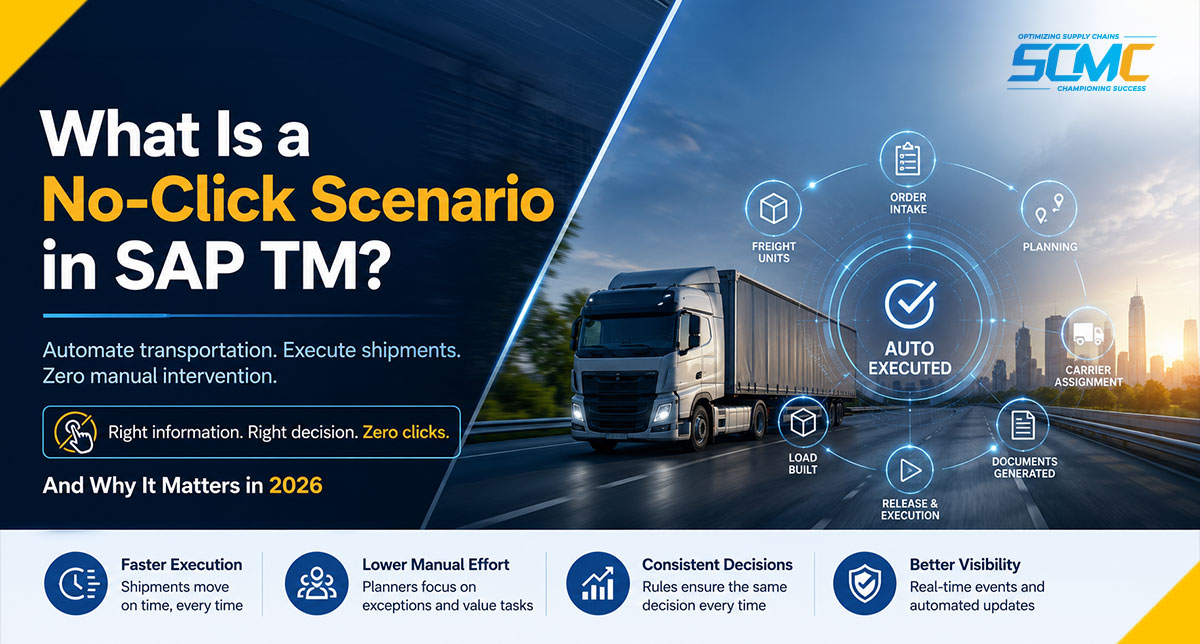
Every Shipment Is Waiting for Someone to Click “Confirm”
Picture a transportation planner’s morning. Two hundred freight orders on the screen. Carriers to assign, capacity to check, routes to confirm, documents to release — one at a time. Nothing is broken. The system works exactly as configured. The problem is that every single shipment waits for a human to click Confirm.
If your SAP TM setup still depends on planners manually confirming every shipment, you’re running the way most companies run — which doesn’t make it sustainable.
Now flip the picture. The same orders arrive, freight units form, planning runs, carriers get assigned, documents go out — and the truck is booked before the planner finishes their coffee. No clicks anywhere. That is a No-Click Scenario, and at SCM CHAMPS we’ve watched it change how transportation teams spend their day.
The pressure behind it is simple math. Volumes keep climbing while planner headcount doesn’t. Every manual confirmation adds delay, and every planner decides slightly differently, so execution drifts across regions. When growth outruns hands on keyboards, the click itself becomes the bottleneck.
What Is a No-Click Scenario in SAP TM?
A No-Click Scenario in SAP TM is an automation setup where transportation processes run end to end — from order intake to execution — without manual intervention, triggered the moment predefined business rules are met. You’ll also hear it called touchless TM, zero-touch transportation, or an automated TM process.
It is not a separate SAP product or a newly launched feature. It’s an implementation approach built on standard SAP TM automation: background jobs, automation rules, conditions, and interfaces. It works in embedded SAP TM on S/4HANA, on-premise and cloud, and in standalone TM.
Definition: A No-Click Scenario is an SAP TM configuration in which planning, carrier assignment, document creation, and execution release happen automatically under predefined business rules. Planners intervene only on exceptions.
Key takeaways
- Built on standard SAP TM automation, configured end to end — not a new product
- Automates planning, carrier assignment, tendering, documents, and release
- Best fit: high-volume, low-exception, rule-friendly lanes
- The prerequisite: clean master data and mature planning rules
What Actually Happens During a No-Click Scenario?
A sales order arrives at 06:10. By 06:12, SAP TM has created the freight units. Nobody touched anything.
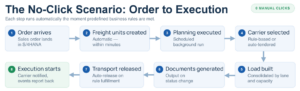
The next background planning run picks those freight units up, consolidates them with freight heading the same direction, and builds the load. Carrier selection rules evaluate cost, allocation, and priority, then assign the carrier — or start tendering automatically if the rules say so. Transportation documents generate on status change. The freight order releases for execution, the carrier is notified, and events report back as the truck moves.
The planner saw none of it. At 08:00 they open the cockpit to a worklist containing only the shipments the rules couldn’t decide — the exceptions. Everything routine has already left the building.
Which SAP TM Processes Can Be Fully Automated?
Most of the standard shipper flow can run without clicks. The question isn’t whether the mechanism exists, but whether your rules and data are ready to drive it.
| Process | Traditional | No-Click | Automation Enabler | Benefit |
|---|---|---|---|---|
| Freight planning | Manual cockpit planning | Scheduled background planning | Background planning run + planning profile | Consistent off-hours planning |
| Carrier assignment | Manual selection | Rule-based assignment | Condition-based carrier selection settings | Faster, consistent execution |
| Freight order creation | Manual FO building | Auto-created from planning results | Planning profile + freight unit building rules | No idle freight units |
| Tendering | Manual RFQs by email | Auto-tendering by rules | Tendering profile with response deadlines | Shorter award cycles |
| Settlement initiation | Manual settlement creation | Batch-created settlement documents | Scheduled settlement background job | On-time carrier invoicing |
| Document generation | Manual printing and sending | Auto output on status change | Output management conditions | No missed documents |
| Event-triggered execution | Phone and email chasing | Auto status updates from events | Expected-event monitoring integration | Real-time visibility |
What Does No-Click Actually Solve?
Too many manual planning decisions. When every consolidation and carrier choice passes through a person, the person becomes the constraint. No-Click moves those decisions into rules that run identically every time. What changes operationally: planners stop producing plans and start reviewing exceptions.
Late shipment releases. A shipment ready but unreleased is inventory pretending to be transportation. Automatic release on rule fulfillment closes the gap between “ready” and “moving.” What changes: cutoffs stop being missed because someone was in a meeting.
Peak season without peak headcount. Volume spikes meant overtime or missed loads. Rules don’t get tired in November. What changes: the same team absorbs seasonal volume because routine decisions scale automatically while people handle the genuinely unusual.
Where Do No-Click Implementations Go Wrong?
Automation fails for predictable reasons — almost never because the software can’t do it. Five failures account for most of what we’re called in to repair.
Poor planning strategy. Teams automate every other process instead of what they exactly need. This deosn help in achieve the real outcome.
Incomplete master data. Rules can only decide with the data they’re given. Missing transit durations, wrong capacities, and stale locations turn confident automation into confident mistakes. Prevention is unglamorous: profile the data, fix it, and assign an owner before the first background job runs.
Over-automation without exception handling. Pushing for 100% automation on day one guarantees that the small share of odd shipments jams the entire flow. Good design decides upfront what the system must never decide alone.
Weak carrier rules. If selection logic doesn’t reflect real contracts, allocations, and lane behavior, planners override it daily — and daily overrides are just manual planning with extra steps.
No governance. When nobody owns the rules, the rules rot. Rates change, lanes change, the logic doesn’t. Treat automation logic like a living product: reviewed, versioned, owned.
One question comes up in almost every automation workshop — most recently from a TM lead at a chemicals shipper: “How can the system release shipments automatically when compliance still has to sign off on some of them?” The answer sits in the design: rules release the routine and route the regulated to a human.
“Automation sticks when planners trust the rules. The moment someone thinks the system made a bad call and overrides it, they check every decision after that. We’ve seen companies roll back entire automation programs because they launched before the planning logic was solid. The fix isn’t better tech — it’s making sure planners see the reasoning and have a clear path to correct the rules, not just override shipments one by one.” — Sarah Jensen, SAP TM Solution Lead, SCM CHAMPS (14 years in transportation management consulting)
Quick self-check:
- Do your planners override system decisions daily?
- Is carrier selection inconsistent across regions?
- Do shipments wait on manual release before moving?
Yes to two or more means you have both the pain No-Click removes and the groundwork gap that decides whether automation succeeds. Mapping that gap is exactly what a readiness check does.
When Should a Business NOT Use No-Click?
Some shipments should keep a human in the loop. Manual approval remains right for high-value shipments where a wrong release is expensive, hazardous materials where regulation demands documented checks, complex export documentation with country-specific requirements, and customer-specific approvals you’ve contractually promised.
None of that argues against automation. It argues for hybrid automation: the routine majority runs touchless while the sensitive remainder routes to a person by rule, not by accident. The skill is drawing that line deliberately, not discovering it during an incident.
How SCM CHAMPS Thinks About Transportation Automation
Our philosophy is short. Automation starts with business processes, not transactions — if the process is wrong, automating it makes it wrong faster. Every automation decision must carry measurable operational value, or it’s configuration for its own sake. And No-Click only works when planning rules, master data, carrier strategy, and exception management are aligned; miss one, and planners quietly go back to clicking.
SCM CHAMPS has worked with global manufacturers, 3PLs, and FMCG companies to move from manual planning to controlled automation in SAP TM.
Where We’ve Done This Before
Two anonymized examples from our delivery work, different industries.
Case 1 — FMCG Challenge: A global FMCG company’s domestic network ran over 800 freight orders a day, with planners building loads and picking carriers manually and each region doing it differently. What we did: Redesigned the planning strategy by lane and delivery priority, cleaned the master data, and configured background planning with exception-based worklists, shifting lanes to automatic carrier assignment after a parallel test. Outcome: Over 70% touchless execution on core lanes. Planners now manage exceptions and carrier performance, and peak volumes run without temporary headcount.
Case 2 — Manufacturing Challenge: A heavy machinery manufacturer shipping from five European sites needed planner intervention to consolidate partial loads for just-in-time schedules — causing daily delays and costly air-freight expediting. What we did: Implemented dynamic consolidation rules on due dates and vehicle capacity, tiered carrier allocation, and auto-release for shipments meeting on-time thresholds; dangerous goods and oversized freight stayed manual by rule. Outcome: Manual touches dropped significantly and expedited air freight fell as more shipments moved on scheduled road services. The team now handles only shipments that genuinely need judgment.
The pattern behind the cases holds across sectors:
| Industry | Typical challenge | Automation focus |
|---|---|---|
| FMCG | High volumes | Automated planning |
| Manufacturing | Complex routing | Planning optimization |
| Automotive | Time-critical deliveries | Exception-driven execution |
| Retail | Seasonal peaks | Scalable automation |
| Chemicals | Compliance-heavy logistics | Controlled automation |
| 3PL | Multi-customer planning | Rule-based execution |
Each operating model gets its own automation design; none of this works one-size-fits-all.
Frequently Asked Questions About No-Click in SAP TM
Does No-Click eliminate transportation planners? No — it changes what they do. Routine consolidation, carrier assignment, and release decisions move into rules; planners handle exceptions, carrier relationships, and improving the rules themselves. The role shifts from executing transportation to supervising it.
Is No-Click suitable for every shipment?
No, and it shouldn’t be forced. High-volume, low-exception lanes with stable carrier agreements automate well. High-value freight, dangerous items, expensive goods, complex exports customer-mandated approvals should be taken in critical consideration. The recommended designs are hybrid. Automation using rule based mechanism and manual intervention where human judgement is neeeded.
What master data is required for touchless TM? The automation is only as good as your locations, transportation lanes, distances and durations, vehicle and resource capacities, carrier profiles with rates and allocations, and freight unit building rules. If planners compensate for bad data with experience, fix the data first — rules can’t compensate the way people do.
What are the main risks of implementing No-Click? The recurring ones: automating an unstable process, releasing shipments the business wasn’t ready to release automatically, exception volumes that overwhelm remaining manual capacity, and rule logic nobody maintains after go-live. All four are design and governance risks, not software risks.
How long does implementation typically take? It depends where you start. SAP TM system with reliable master data, automated lane is achievable in around eight to twelve weeks. Expansion across lanes, modes, and regions is a phased processs and takes several months. An realistic readiness assessment is what keeps up with the timeline.
The Takeaway
No-Click is not about removing people from transportation. It removes repetitive work from people, so planners spend their day on exceptions, carriers, and customers instead of confirmations. The organizations that succeed with it share one habit: before automating anything, they check whether their planning rules, master data, and processes are mature enough to trust with the decision. That assessment is where we’d tell anyone to start — the work SCM CHAMPS has done across industries.
→ Talk to an SCM CHAMPS TM expert — 30 minutes, a straight answer on whether No-Click fits your operation, no sales pitch. [CONTACT LINK]
How much of your TM process is still manual — 80%, 50%, or under 20%? Tell us in the comments. Our team replies to every one.